


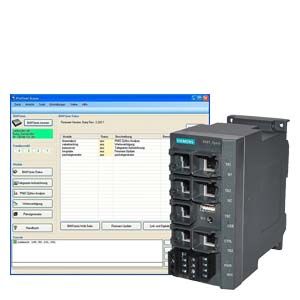
All bus analyzer functions are controlled by the Bus Analyzer Scope program that ships with the product. This Windows application is connected to the bus analyzer sys module via an Ethernet connection. This is possible via a direct connection, via a network or via a VPN tunnel. The four analysis ports can be used by all function modules but not at the same time. They need to be enabled and assigned to the module being used. On completion of the parameter assignment and after starting the relevant analysis function, the connection between Bus Analyzer and Bus Analyzer Scope can be terminated, in other words, the module then works alone. The frame recording provides a comfortable option of recording communication on Ethernet connections at speeds from Fast Ethernet to gigabit Ethernet. PROFINET analysis automatically detects all important parameters of a PROFINET system. The Bus Analyzer analyzes the frame traffic in real time in terms of frame type, cycle times and many other important characteristics of the network. The number of frames sent by each node per time unit can be visualized in a cycle time diagram. These are displayed graphically in a distribution curve. At a glance, it is possible to see how well the PROFINET component keeps to the cycle.  During the analysis of PROFINET IRT, not only the degree to which individual components adhere to the cycle is important, but also the offset of the time of sending within the cycle; in other words, its behavior in conjunction with the other communications partners in the network. The offset diagram can display the distribution curves of all nodes in the cycle to allow a statement to be made regarding the quality within the entire network and the time slice distribution of its nodes.  Based on intuitively structured filter menus, the online value tracking provides a simple and uncomplicated means of extracting data from the frame traffic. In contrast to the frame recording, complete frames are not saved here but rather individual values of the relevant communications partners transferred via PROFINET. To be able to select the values, the address of the node, the byte position of the value within the frame and the number of bytes to be read must be specified in the filter. The size of the values is limited to 8 bytes. All available formats can be interpreted (binary, integer, analog, ...). The packet generator allows any Ethernet frames to be injected into the network. To allow this, all four analysis ports are available and are independent of each other. As an alternative, the ports can also be coupled together in pairs as sender/receiver to be able to read in sent frames and to verify the read frames with the sent frames.
At the end of the action, all important parameters (bus load, duration etc.) are output as statistics. The packet generator only executes with the Bus Analyzer without TAP. All the modules listed above can also be remotely controlled by a script. To allow this, each action taken by the user is logged in the integrated script window. The log can be saved, edited and transferred later to Bus Analyzer Scope when this is called. All the instructions in the script are then executed. This allows automated test sequences, for example for setting up test automats. The manual contains an overview of all the script commands that can be used. |
| Каталог 2018 | Каталог 2017 | Каталог 2016 | Каталог 2015 | Каталог 2014 | Каталог 2013 | Каталог 2012 | Сертификат | Контакты | Карта сайта | Поиск |