


Reliable functioning of analyzers is of decisive importance for process control. It is necessary to record, correct and transmit measured values, to set and modify parameters, to check functions, to update calibrations, and to scan status signals e.g. for preventive maintenance. Communication between the operator and device is therefore an important part of process analysis, and the offered facilities have become a decisive performance feature of analyzers. ExtractiveThe gas analyzers of Series 6 (ULTRAMAT 6, ULTRAMAT/OXYMAT 6, OXYMAT 6, OXYMAT 61, OXYMAT 64, FIDAMAT 6, CALOMAT 6, CALOMAT 62) as well as the ULTRAMAT 23 offer the following communications facilities in addition to data transmission over analog and digital outputs:
RS 485 interface The serial interface integrated as standard permits communication between several analyzers over the internal bus (ELAN). Parameterization is carried out using the analyzer's menu. Networking over ELAN ELAN communication is used e.g. for the correction of cross-interference. Direct connection is only possible between Siemens gas analyzers.  Bus cable with plug connections, ELAN networking
Bus terminating resistorsPins 3-7 and 8-9 of the first connector of a bus cable must be bridged (ELAN networking). Note It is advisable to install a repeater on the device side in the case of a cable length of more than 500 m or with high interferences. Networking with SIPROM GA When used externally, the RS 485 interface requires software matched to the analyzers, e.g. SIPROM GA. SIPROM GA is a software program for communication between PC/laptop and analyzers. A maximum of 12 devices (electronics modules) with up to four channels/measured components of the following type can be connected, displayed and remote-controlled per COM interface:
SIPROM GA allows access to device parameters, right up to the configuration of devices. All analyzer functions (except factory default functions) can be remote-controlled and monitored in this manner. SIPROM GA is therefore an ideal servicing and maintenance tool for Siemens gas analyzers. In addition to remote control of all operator functions, SIPROM GA offers complete access to all diagnostics data. SIPROM GA therefore permits preventive maintenance as well as fast responses when maintenance becomes necessary or when the production sequence is changed. SIPROM GA ensures:
In addition to output of TAG No., components, current measured values, comprehensive diagnostics information (status) and parameter settings on the analyzer display, SIPROM GA also offers the following features:
Access to the analyzers using SIPROM GA is carried out either:
Hardware requirements The following hardware and system requirements must be provided for the PC/laptop configuration in order to use SIPROM GA:
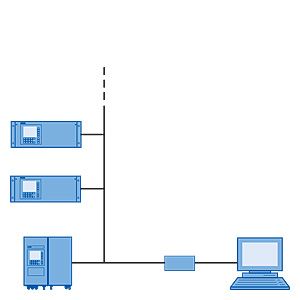
Accessories for the network For cables, connectors, repeaters etc., see Catalog IK PI or CA 01 on the Mall under SIMATIC NET communications systems/PROFIBUS/network components. Networking with SIPROM GA via converter Up to 12 analyzers with max. four components each can be networked. The functional principle is shown in the following illustration.  Typical design of an RS 485 network with SIPROM GA The gas analyzers can be installed at distances up to 500 m. One network can be connected to each COM port. Networking with SIPROM GA via Ethernet When networking with Ethernet, there are no limitations for the distance between PC and gateway. In addition, communication over Ethernet permits connection of several gateways to one COM port, and thus the possibility for monitoring and operating several widely distributed or separately installed analyzers/systems from one station.  Typical design of an RS 485 Ethernet network with SIPROM GA PROFIBUS The usual transmission of measured values and fault messages via analog and digital outputs requires complex cabling. On the other hand, when using PROFIBUS DP and PROFIBUS PA, one single two-wire conductor is sufficient for digital transmission e.g. of all measured values (also from several channels), status information or diagnostics functions for preventive maintenance. The PROFIBUS DP version with its high transmission rate for relatively small data quantities per device is widely used in production automation, whereas PROFIBUS PA takes into account the features important for process engineering, e.g. large data quantities and use in hazardous areas. The limited dynamic performance of 4 to 20 mA mA signals can be replaced, the laborious configuring of measuring ranges can be omitted. By using simulated measured values without media, increased safety can be provided for the plant configuration, and configuration errors can be avoided. Parameter sets can be generated offline (from your desk) and subsequently downloaded and saved in the device. Local operations can thus be reduced to a minimum. The Siemens gas analyzers
are PROFIBUS-compatible when using an optional plug-in card (retrofitting also possible) and therefore comply with the "Device profile for analyzers" defined as binding by PI (PROFIBUS International). Customer benefits include enormous savings potential in all plant areas, covering configuration and commissioning, operation and maintenance, up to subsequent plant expansions. Operation of the gas analyzers from a control system or a separate PC is possible using the SIMATIC PDM (Process Device Manager); this is software which executes under Windows and which can also be integrated into the SIMATIC PCS 7 process control system. This permits a clear presentation for integration of the analyzers in the system as well as for the complex parameter structure of the analyzers. Direct connection of the analyzers to a control system is also possible without PDM, e.g. using STEP7, but this necessitates additional programming and offers less user friendliness. In most cases, this direct connection is therefore only applicable if acyclic (device operation) data are not used. A differentiation is made between cyclic and acyclic services. Cyclic services are used to transmit time-critical data such as measured values and statuses. Acyclic services permit scanning or modification of device parameters during operation. Both graphic displays and values can be output on a PC. Signaling of maintenance, fault and diagnostics information is also cyclic. These data are displayed in plain text when using SIMATIC PDM. The digital outputs can also be switched using cyclic services, thus also permitting triggering of relays over PROFIBUS (e.g. for measuring point switchover, calibration etc.).  Schematic structure of a PROFIBUS system The following acyclic device parameters and configurations can be used in PROFIBUS DP and PROFIBUS PA by means of SIMATIC PDM:
Use of PROFIBUS offers the following customer benefits:
Generic communications interface User benefits are offered thanks to numerous functions which are mainly required in the automotive industry, for example to carry out repeated linearization. In contrast to PROFIBUS and ELAN, communication is only possible between one device and one PC, and takes place according to the master/slave principle. The device only transmits data when requested by a command telegram, where only one command can be processed and replied to at a time. The generic communications menu can be called using Function88, and the parameters adjusted. In situ continuous process gas analysisLDS 6 can send and receive data over an Ethernet connection together with the LDScom software. This installation and service tool is able to check and adapt device status and calibration parameters from a remote location. If necessary, even a complete system check can be carried out over the remote connection. If servicing is necessary, the required information can be sent to the Siemens service engineer by modem, and he can then carry out the appropriate measures from the remote location. This facility for remote maintenance and diagnostics is implemented using a standard LAN modem.  External connection of LDS 6 via a modem for implementing remote maintenance measures |
|||||||||||||||||
| Каталог 2018 | Каталог 2017 | Каталог 2016 | Каталог 2015 | Каталог 2014 | Каталог 2013 | Каталог 2012 | Сертификат | Контакты | Карта сайта | Поиск |