


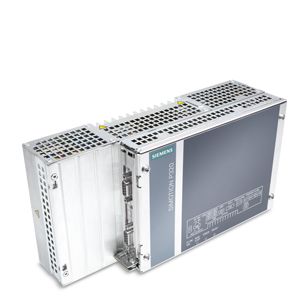
System conceptThe control and Motion Control software execute on the basic system (SIMOTION Kernel). The internal PC communication provides high-performance data exchange between the SIMOTION Kernel and the Microsoft Windows operating system. Further processing of this data, e.g. using OPC server, is possible in any Microsoft program. SIMOTION basic functionalityThe SIMOTION P systems provide the following basic functionality for a wide variety of automation requirements:
This basic functionality can be expanded with loadable technology packages, if required. SIMOTION technology packagesA special feature of SIMOTION is that the operating system functionality can be expanded by loading technology packages, such as:
Since the technology functions have modular licenses, you only pay for what you will actually use: "pay only for what you need" Configuring/parameterizing/programmingSIMOTION SCOUT is a powerful and user-friendly engineering tool. It is an integrated system for all engineering steps, from configuring and parameterization, through programming, to testing and diagnostics. Graphical operator prompting, using dialog boxes and wizards, as well as text-based and graphical languages for programming, considerably reduce the familiarization and training periods. Series commissioning with optional USB Flash DriveFor the purpose of commissioning several Motion Controllers at once, it is possible to copy a pre-generated data image to the USB flash drive using SIMATIC IPC Image & Partition Creator (own software). The SIMATIC IPC Image & Partition Creator must either be ordered separately, or is pre-installed on the SIMATIC IPC USB flash drive (see selection and ordering data). Operator control and monitoring (HMI)Operator control and monitoring can be performed:
Communication utilities which support user-friendly data exchange with HMI systems are integrated in the basic functionality of SIMOTION P. Both PROFINET and PROFIBUS (optional) as well as Industrial Ethernet can be used for communication. The HMI devices can be connected to SIMOTION P over PROFINET, Industrial Ethernet or PROFIBUS. They are configured by means of SIMATIC WinCC (TIA Portal). With the SIMATIC NET communications software, an open, standardized OPC interface is available for accessing SIMOTION from other Windows-based HMI systems.. SIMOTION IT service and diagnostic functionsSIMOTION IT provides SIMOTION P with an integrated web server on which, for example, user-specific web pages can be stored. Read and write access can be made to the Motion Controller variables. Java scripts or applets also allow the implementation of active operation and display functions in the web pages that can be executed on a client PC with standard Internet browser. Process and data communicationThanks to its integrated interfaces, SIMOTION P supports both process and data communication. The SCOUT engineering system is provided for user-friendly communication configuration and diagnostics. Position-controlled motion control for servo drivesDrives with digital setpoint interface SIMOTION P Motion Controllers enable position-controlled motion control for drives with digital setpoint interface via PROFINET IO with PROFIdrive or optionally with PROFIBUS DP. Position control and pressure control for hydraulic drivesWith SIMOTION P and the SIMATIC ET 200S High Speed I/Os, minimum cycle times of 250 ?s can be achieved over PROFINET with IRT (Isochronous Real Time). Highly dynamic control loops can therefore be achieved for hydraulic applications with position and pressure control.  Example: Closed-loop control of a hydraulic press with SIMOTION P320-4 The necessary sensors and actuators, such as
are connected over the SIMATIC ET 200S distributed I/O system, which was equipped with the necessary high-speed I/O modules beforehand to suit the application. On the basis of PROFINET, it is therefore possible to synchronize hydraulic drives as well as electrical drives. In conveyor systems and press lines in the automotive industry, plant-wide automation solutions can be implemented in which both electrical drives (winders, cross cutters, roller feeds) and hydraulic drives (e.g. deep-drawing presses) are deployed. Indication and diagnosis of operating statusA SIMOTION P system does not have any pushbuttons or switches for changing operating modes (RUN/STOP). This task is performed (when a monitor/display is connected) by a software monitor (SIMOTION P State), which is operated using the keyboard or mouse.  SIMOTION P State This monitor (with English as interface language) visualizes the operating states during start-up and operation. Other functions are, for example, loading (Restore) and saving (Save) user programs or starting (Restart) or shutting down (Terminate) the Motion Controller. During shutdown, important data (retain data) are stored on the external CFast card while the device's power supply is shutting down so that the most current data is ready for use as soon as the device is restarted. The SIMOTION P intelligent diagnostic system constantly checks the functionality of the system and registers errors or specific system events (e.g. timing errors, module or network failures). |
| Каталог 2018 | Каталог 2017 | Каталог 2016 | Каталог 2015 | Каталог 2014 | Каталог 2013 | Каталог 2012 | Сертификат | Контакты | Карта сайта | Поиск |